
Understand SCA basics
This page explains the SCA (Strong Customer Authentication), how to use its endpoints, and how it is implemented in the API.
- Introduction
- Introduction
SCA (Strong Customer Authentication) is a regulatory requirement under the second European Payment Services Directive (PSD2). It strengthens online payment security and protects Users from fraud.
Applicability:
Since March 14, 2022, SCA (Strong Customer Authentication) applies to all online transactions in the European Economic Area (EEA) and the United Kingdom.
Purpose:
SCA (Strong Customer Authentication) was introduced to ensure secure payments, reduce fraud, and comply with PSD2 regulatory requirements (ACPR & RTS). It builds on the original PSD (2007) by reinforcing identity verification and secure operations for payment services.
- Why SCA is Required
- Why SCA is Required
Strong Customer Authentication (SCA (Strong Customer Authentication)) is a legal obligation under PSD2. Its purpose is threefold:
- Regulatory compliance - Ensures alignment with PSD2, ACPR supervision, and Regulatory Technical Standards (RTS).
- Security - Protects Users against fraud by reinforcing identity checks.
- User trust - Provides a safer experience while maintaining usability.
- When SCA is Required
- When SCA is Required
SCA (Strong Customer Authentication) is not applied uniformly. It is required in specific contexts:
A. First Login and Periodic Re-authentication
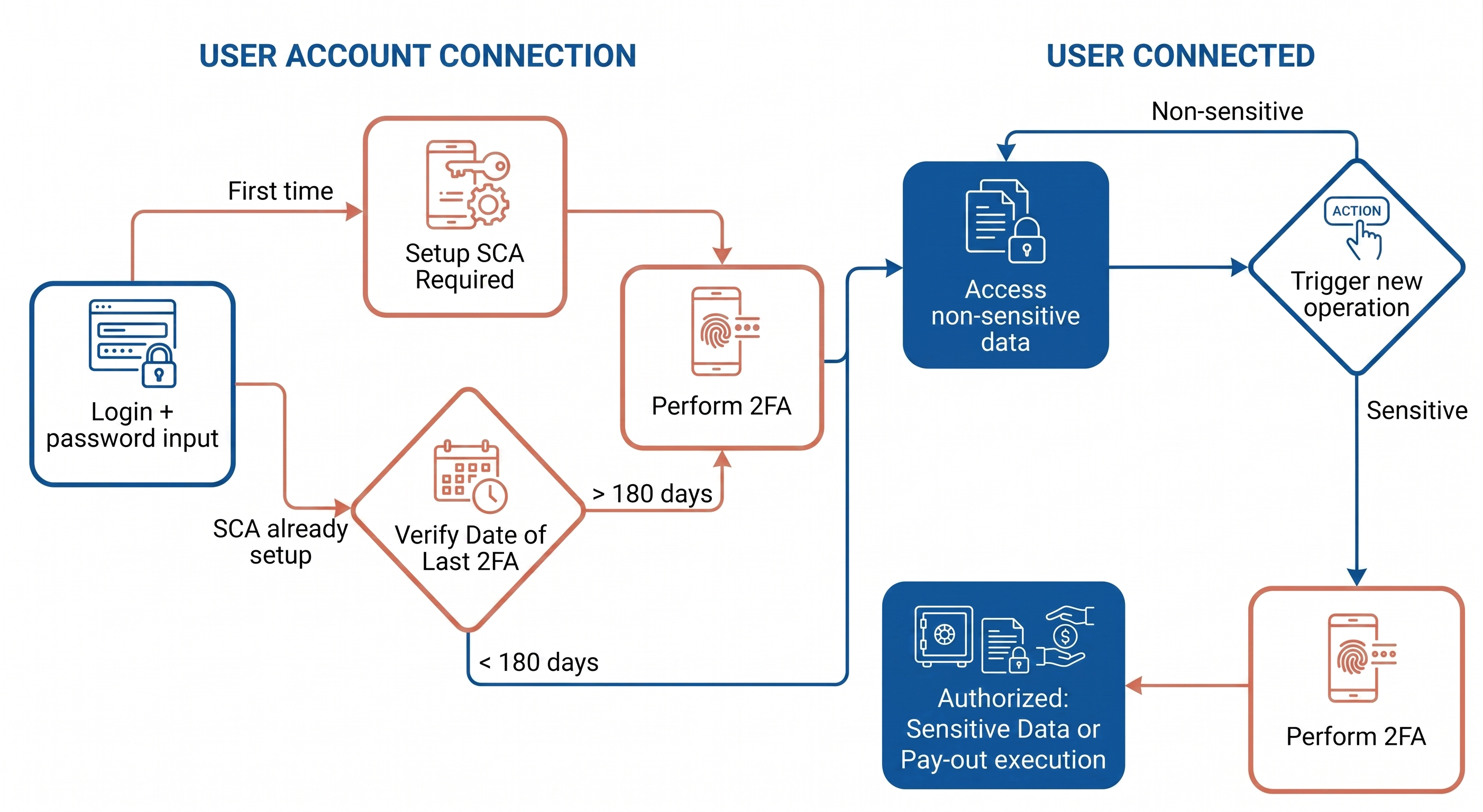
- At the first login (after KYC onboarding confirmed by Mipise Payment Services), **User**s must authenticate with a two independent factors mechanism.
- Afterwards, re-authentication is required every 180 days.
During the 180-day period, Users may still access:
- Their Available Balance
- Their whole transaction history
using only their regular password. This exception is designed to preserve usability while remaining compliant.
B. Sensitive Remote Operations
SCA (Strong Customer Authentication) is systematically required when performing operations that could cause financial loss or involve sensitive data changes.
Examples:
- Adding a new beneficiary
- Updating personal information
Each such action must be explicitly authorized by the User through the full SCA (Strong Customer Authentication) process.
C. Payment Operations
SCA (Strong Customer Authentication) is mandatory for every payment operation triggered by a User.
Example:
- Executing an external SEPA transfer (from the User’s Payment Account to another External Account).
In practice at Mipise Payment Services, this means no transfer or outgoing payment can be initiated without a completed SCA (Strong Customer Authentication) workflow.
- SCA Factors
- SCA Factors
SCA (Strong Customer Authentication) is based on the principle of combining two out of three independent factor categories. If one factor is compromised, it must not affect the reliability of the others.
| Category | Description | Examples |
|---|---|---|
|
Knowledge
|
Something the user knows. | Details Password, PIN, secret code |
|
Possession
|
Something the user owns. | Details Smartphone, hardware token, email access |
|
Inherence
|
Something the user is. | Details Fingerprint, facial or voice recognition |
Factors Used at Mipise Payment Services
At Mipise Payment Services, three factors are implemented in practice:
- Email — used as a possession check.
- Phone number — used as a possession check through SMS validation.
- Secret code — used as a knowledge factor, set up and confirmed by the User.
A User is considered fully authenticated (workflow_completed = true) only once all three factors are validated. This ensures compliance with PSD2 and the highest level of security.
- Key Concepts
- Key Concepts
Platform (platformUUID)
platformUUID)A Universally Unique IDentifier for each platform.
User (userUUID)
userUUID)A Universally Unique IDentifier for each User across API requests (project owners, investors, managers).
Strong Customer Authentication (SCA (Strong Customer Authentication))
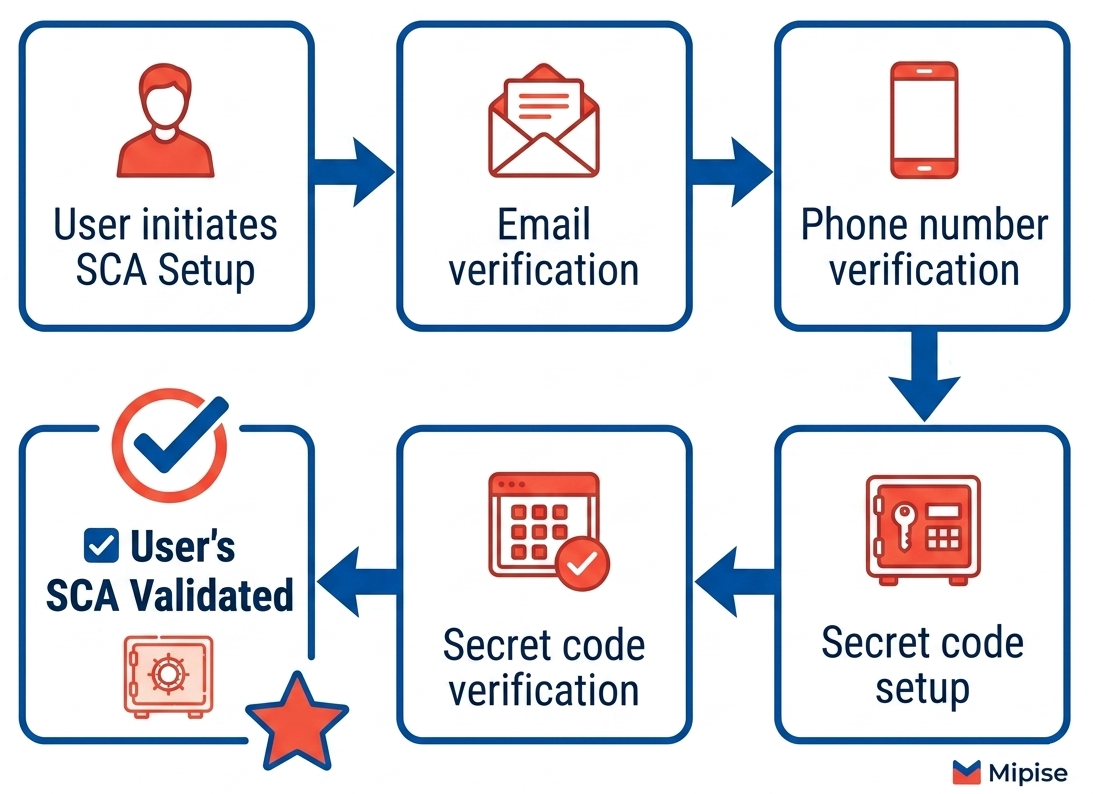
Sequential multi-factor authentication mechanism: email → phone → secret code.
Workflow
A sequential set of validations, accessible via GET strong_auth/status.
JWT (JSON Web Token)
A Short-lived token proving SCA (Strong Customer Authentication) is done. Must be reused while valid.
Session vs Operation
- Per session → access valid for a given time.
- Per operation → SCA (Strong Customer Authentication) required for each sensitive operation.
- Typical Workflow (SCA setting)
- Typical Workflow (SCA setting)
After creating a User, the SCA (Strong Customer Authentication) workflow runs as follows:
1. Email verification
POST <Glossary>OTP (One-Time Password)</Glossary> generate /email_by_email→POST OTP (One-Time Password) verify /email_by_email- For a new User, only
by_emailOTP (One-Time Password) is required. - If the email source is reset later but phone number is already validated, validation will require both
by_emailandby_sms.
2. Phone number verification
-
Always requires the two verifications:
a. Verification by email
b. Verification by SMS
-
Each step uses:
POST OTP (One-Time Password) generate→POST OTP (One-Time Password) verify
3. Secret code setup
-
User sets a code with
POST Secret Code Setup. -
Verification then requires the two methods:
a. Verification by email
b. Verification by SMS
-
Once fully validated → Retrieve the JWT (JSON Web Token) with
POST Secret Code Verify.
- Resetting a Source
- Resetting a Source
Use the endpoint : POST strong_auth/reset/{source}
Then you must redo the verification for the specific source (email, phone_number, or secret_code).
Other validated factors remain intact.
Example: Resetting
phone_number→ Only the phone number verification from the workflow above needs to be done.Don't forget that you will need the
by_emailandby_sms**OTP (One-Time Password)**s if you reset the email source but that you keep your phone_number validated.
- Key Takeaways
- Key Takeaways
- SCA (Strong Customer Authentication) is a regulatory requirement under PSD2, supervised by ACPR and RTS.
- It protects sensitive operations and all payments through multi-factor checks.
- At Mipise Payment Services, the workflow relies on email, phone, and secret code, all required for full validation.
- Use the
GET Strong Auth Statusendpoint to confirm readiness before initiating any regulated action.
Want more ? Check our Swagger for technical information :
Returns the current status of the SCA (Strong Customer Authentication) workflow.
Generates an OTP (One-Time Password) code to validate a specific step in the SCA (Strong Customer Authentication) workflow.
Validates the OTP (One-Time Password) code provided for the specified process.
Configures the secret code of a User.
Verifies the provided secret code and, if successful, returns a JWT (JSON Web Token).
Resets the validation state of a specific channel.
Logs in an agent by providing username and password.
Updated 4 months ago